Surprise! We’ve got a bonus In-Process for you this week. We wanted to give a shout out to those heading to CSUN, and to let you all know that this year we’ll be heading to Sight City. We’ve got another new beta, and we answer your questions on using AI to create add-ons.
NV Access at Sight City
As NVDA is used globally, we are regularly considering opportunities to attend conferences in different locations where we can connect with our diverse community of NVDA users and the wider assistive technology community. Therefore, we are excited to announce that members of the NV Access team will be attending the 2026 Sight City Conference which is being held in Germany during May this year. We are excited about the opportunity to meet with NVDA users from Europe and around the world who will be attending, as well as many like-minded organisations, professionals, educators and researchers, experts in assistive technology from Europe and globally.
Unfortunately, this means that we will not be attending the 2026 CSUN Assistive Technology Conference. We will be sharing updates on what is new with NVDA and what is on our roadmap via our usual channels:
- Our In-Process blog, and don’t forget you can sign up to get the blog via email
- Our social media
- and the official NVDA user’s email group
NVDA 2026.1 Beta 6
Beta6 of NVDA 2026.1 is now available for download and testing. For anyone who is interested in trying out what the next version of NVDA has to offer before it is officially released, we welcome you to download the beta and provide feedback using our issue reporting process.
Changes introduced in Beta 6:
- The way that the state of add-ons (disabled, pending update etc) is saved internally has changed
- The 32-bit synth driver host is now correctly signed and versioned, and no longer includes extraneous files
- Updates to translations
Changes introduced in Beta 5:
- Audio ducking is now reported as not supported when a SAPI 4 or 32-bit SAPI 5 synthesizer is in use.
- The state of screen curtain is once again restored when cancelling from the settings dialog
- Included the expanded path in the dialog that is shown when attempting to create a portable copy at a relative path
- Improved the way MathCAT’s settings are validated
- Added an option to use native math speech in Microsoft Word and Outlook
- Updates to translations
Let’s discuss Add-ons
There has been a bit of discussion around add-ons recently. Can AI can be used to assist in writing add-ons? Do I still need to know how to program? What checks and reviews are done on add-ons? Let’s jump in and answer those and other questions:
Can AI can be used to assist in writing add-ons?
Yes. What we would strongly say is that AI is a tool, just like spell check for writing. And just like spell check, AI does not always get it right, so it is important to understand the output it gives you and how to integrate that into an add-on.
Do I still need to know how to program?
Yes! This is really important. We have already had incidents where people have used “vibe coding” to create an add-on when they had no understanding of how it worked and it has caused problems. We are fortunate that with the code for NVDA and our documentation being open source and readily available, most of the popular AI tools do have it in their learning, but that doesn’t mean they get everything right. It does seem easy to ask your favourite AI to write an NVDA add-on, and they can do an impressive job. The risks of doing this without understanding what it has created include:
- The add-on could literally do anything, including permanently deleting data (even data unrelated to the purpose and which may not be noticed immediately), break your PC, or even leak your data online.
- The add-on may seem to work on your machine, but may not work in other cases.
- The add-on may do things which no-one expects, and which may not even be noticeable because they may not be at all related to what you wanted it to do.
- There can be conflicts with other add-ons you didn’t anticipate. These can be as obvious as clashing keystrokes, or as frustrating as using another add-ons name when NVDA is running in another language.
- The code may do unexpected, inefficient things, from creating variables which aren’t used, to using ‘magic numbers’ instead of information which is available and may change.
That is not an exhaustive list, but just some examples we have already seen.
How do you write an add-on?
We have documentation for that!
- NVDA add-on documentation.
- Here is the NVDA developer guide: https://download.nvaccess.org/documentation/developerGuide.html
- Add-on developer guide and information from Joseph Lee: https://github.com/nvdaaddons/DevGuide
Who can help?
In encouraging a willingness to learn the code, it is important to add that we have an AMAZING and incredibly supportive add-on community. Members of the NVDA add-ons email group are willing to help new developers, if you ask nicely and are willing to learn.
How should you use AI?
Quite simply, the same way you would if you were asking it to help with your resume for an important job, drafting a letter for a lawyer, or choosing clothes to wear for your wedding: You need to have enough knowledge of what it is doing, to understand when it is on track and when it is vastly wrong.
How do you submit an add-on to the store?
That process is documented in the NVDA add-on store submission guide. It is important to fill in the form manually to submit your add-ons. We have found that automated AI agents will mislead you and try to encourage you to submit via CLI or do it for you, neither of which currently works.
If you get stuck, please do ask in the NVDA add-ons group.
What checks and reviews are done on add-ons?
Publishers must be approved to submit add-ons, on a per add-on basis. This is manually done by NV Access the first time you submit EACH add-on. Once approved, you can submit later updates for that add-on without this approval, but you will need a new approval to submit another add-on.
When you submit an add-on, several automatic checks are done. These only confirm that basic details are correct and verifiable, such as the name and URL matching across the several places they are needed, and that the URL itself does appear to be valid, and that details such as the last tested and minimum NVDA version details are valid.
Add-on code is also verified with VirusTotal to check for malware. These are highlighted to the submitter for review. Please note that a positive result does not prevent an add-on from being accepted. In NVDA 2026.1, VirusTotal scan results are available in the details for an add-on. An action has been added to view the full scan results on the VirusTotal website. Information such as the VirusTotal results and reviews allows users to better evaluate the suitability of add-ons themselves.
If any of these automated checks fail, there will be a message left on the issue. Please check this and update as needed before resubmitting.
To go with this article, I thought it was fitting to ask AI to make me a relevant image:
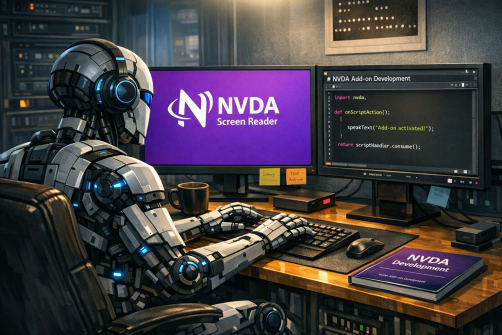
Perhaps illustrating the issue of AI being very clever, but also making mistakes – the image is very well drawn – and I do like the coffee mug and the post it note with “Debug” underlined three times! But for all that, the NVDA logo is not correct. It reminds me of a cross between the old Netscape Navigator browser logo, with a couple of lines around and through the “N” reminiscent of the Internet Explorer logo.
That’s all for this week. Do try NVDA 2026.1 Beta 6, and We’ll be back in a couple of weeks with more!